I've been working on organizing my fabric stash. I got done with that a couple of weeks ago. After going thru closets, dresser drawers, and bins. I used the hanging shelf organizers in the hanger rack; along with the polar notions fabric boards. (To my surprise I had far less fabric than I had expected! That just means room for more  ). I ended up with a nice stash in my closet:
). I ended up with a nice stash in my closet:
Getting my stash sorted was only half the problem. Now I needed to catalog the stash. A while back I was at an estate sale and found a 3 ring binder called the "Fabric Diary". It contains pages for recording your fabric, and info on projects you are working on. I tried to locate the original publisher but looks like they are no longer in business. I took two of the pages to my local print shop and had copies made.


So now I know what I have, How much of it, and where its stored. I'm no longer overwhelmed by my stash.
Once I got the fabric under control, I then started working on my pattern stash. I had patterns in plastic bins in the closet; in a chest drawer, etc. Then there were the vintage patterns that my mom keeps sending when she finds some. So it was definitely time to organize them.
I had been using Pattern File on my computer. But I don't think this is the way for me to go. Considering the fact that I now have a decent size vintage collection, and I have to scan them into my computer anyway; it wasn't saving me a lot of work. So off to sewing.patternreview.com, to find alternatives. Well, I found exactly what I needed. I have Microsoft Office one note on my laptop, iphone, and new ipad. So why not make use of it. Now I can:
- Portability - I can look at my patterns anywhere on my iphone/ipad
- Ease of entry - For current patterns I just go to the pattern company website and print the pattern to my Onenote application, and if its a vintage pattern I just scan it on my computer.
Eventually, I'll move my fabric stash organization to OneNote.
If you want information on using OneNote go to On the Road To Sew Wear or to Chantilly Dreams to get detailed instructions on how to set things up. (Why re-invent the wheels, when both of these sewing buddies have done an excellent job explaining how to use onenote already!). I have my patterns saved on a sky drive that I can access from my ipad and iphone.
Now that I've gotten my patterns sorted, I've found that I have multiple copies of some patterns (Augh! Don't you hate that!).
|
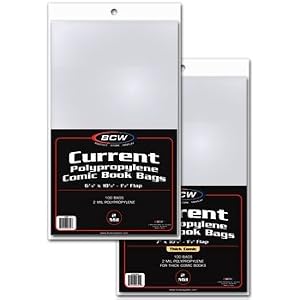
I also purchased comic book bags to put my patterns in. This is especially a big help with storage of some of my vintage patterns. I purchased these in small sizes for the standard pattern sizes and in larger magazine sizes for my Vogue Designer patterns. It only costs about $7 for a package of 100. And I used repositionable tape to seal the bags closed. I've got them all neatly organized now by pattern company and number in my pattern cabinet.
Well with all of this organizing, I should be ready for my trip to New York for Pattern Review Weekend. I can't wait. This will be my first trip to NY! Me, NY, and fabric!! - a sewaholics dream!!!!

Sent from my iPad

Great minds must think alot. While I'm patiently awaiting the arrival of my fabric shelves, I spent some time cataloging my fabric this weekend too! I downloaded the Fabric Stash app on my IPAD. It is really neat. It allows you to photograph and record the type, color, yardage, and much, much more for each piece of fabric in your stash. I love it! I noticed your post was done with an IPAD, so I thought I share the great app with you. I downloaded the pattern app too! After I tackle this fabric, I'll move on to the pattern.
ReplyDeleteopps, I meant "a like" LOL
ReplyDeleteI wish I was going to NY, I can't make it this year. I have a bus trip already planned for May 5! Have fun at PR Weekend.
ReplyDelete